Understanding Toner Cartridges
What Is a Toner Cartridge and How Does It Work?
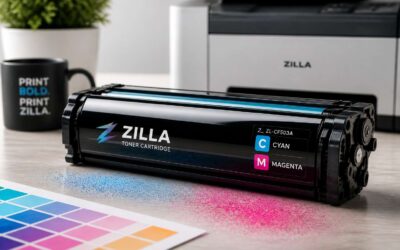
A single toner cartridge can print roughly 2,000 pages, yet few South African offices pause to understand the mechanism. A toner cartridge is a sealed vessel holding fine plastic powder, which is melted onto paper through heat and pressure. Unlike liquid ink, this dry toner responds to static electricity.
Inside, a rotating drum attracts particles only where the image should appear. Laser beams alter the drum’s charge, creating a latent image. The toner clings to those charged zones, then fuses under a heated roller. That process explains why most consumables for toner cartridges emphasise drum quality and particle size.
Consider these steps in operation:
- The laser discharges specific points on the drum.
- Toner adheres to the discharged areas.
- The paper picks up the toner via opposing charge.
- Heat permanently bonds the toner to the fibres.
Types of Toner Cartridges: OEM vs. Compatible vs. Remanufactured
South African offices spend millions each year on supplies for toner cartridges. The choice between OEM, compatible, and remanufactured units determines both cost and print reliability. OEM cartridges come from the original equipment manufacturer. Compatible cartridges arrive from third-party producers who reverse-engineer the design. Remanufactured cartridges are used units that have been cleaned, tested, and refilled.
The price gap between these options reflects different value propositions. OEM units cost the most. Compatible units offer savings with variable results. Remanufactured units sit somewhere between, depending on the remanufacturer’s standards. Here is a practical breakdown:
- OEM: factory-grade consistency
- Compatible: lower cost, mixed performance
- Remanufactured: environmentally conscious, quality varies by supplier
Each option serves a different priority. Selecting supplies for toner cartridges requires weighing equipment warranty, print volume, and tolerance for risk.
Key Components Inside a Toner Cartridge
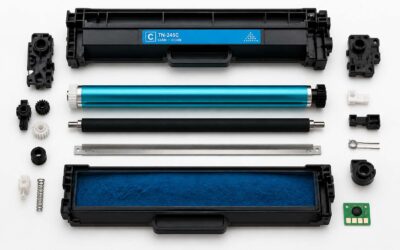
Every toner cartridge contains a miniature engineering system most users never see. I have opened dozens, and the precision still impresses me! The photosensitive drum, the wiper blade, the magnetic roller, and the toner hopper work in sequence. Each component has one job. Failure in any part alters the final print.
The drum holds an electrostatic charge that picks up toner powder where the laser draws the image. The wiper blade scrapes leftover toner after each rotation. The magnetic roller controls powder flow to the page. Any wrong step shows up immediately.
What matters for toner cartridges in practice:
- Drum condition drives print density
- Wiper blade wear causes ghosting
- Roller alignment affects banding
- Toner particle size determines sharpness
These parts degrade at different rates. Reliability varies for toner cartridges on the market. One cartridge lasts 5,000 clean pages; another streaks by 800. The difference lies in component tolerances inside each unit.
Toner Yield Ratings and Page Coverage Explained
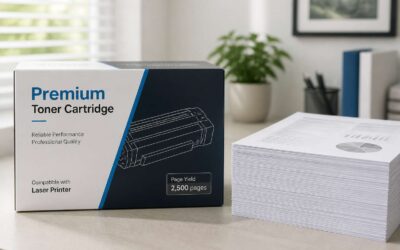
The yield rating printed on any box for toner cartridges is a quiet promise, a figure that hints at pages yet to come. But that figure assumes a 5% page coverage, a standard that rarely mirrors reality. A dense invoice or a dark presentation devours toner far faster than any office worker expects.
- 5% coverage equates to roughly five lines of text on an A4 page
- 20% coverage consumes the yield four times quicker
- Actual usage in South African offices often sits between 10 and 15%
When a cartridge dies early, the fault usually lies in the coverage calculation, not the components. This ratio reveals the true endurance for toner cartridges on the shelf. A yield rating is simply a shadow; page coverage is the light that exposes it.
Choosing the Right Toner Cartridge for Your Printer
Matching Cartridge Models to Your Printer Brand
In South Africa, the printer aisle is a maze of labels and logos. The correct choice for toner cartridges is never about the brand alone. It is about the exact model number printed on the old unit.
Your printer’s manual lists the precise cartridge series. A single letter difference can render the cartridge useless. Matching the model to the machine is the only way to avoid a wasted purchase. You can find the model in several places:
- Check the physical cartridge body.
- Look at the internal printer label.
- Use the on-screen menu.
Retailers in Johannesburg and Cape Town stock hundreds of variants. A quick check of these details prevents a frustrating return trip.
Evaluating Print Quality Requirements
A printed page holds a mirror to your standards. Most South African offices overlook this until a faded report lands on a client’s desk. The clarity of text, the density of blacks, and the vibrancy of colour all stem from the cartridge’s formulation and your expectations.
Evaluate your actual usage before settling on a specific product. A legal firm printing contracts demands crisp, smudge-resistant text that survives highlighter pens. A design studio requires accurate colour reproduction for proofs. A school needs durable prints that withstand heavy handling. These scenarios require different toner formulations, and the cheapest option often fails under real-world scrutiny.
Consider the following quality attributes when comparing options for toner cartridges:
– Sharpness of fine text edges, especially at smaller font sizes
– Resistance to moisture and smudging after the page has cooled
– Consistency of density across a full page of solid colour
– Compatibility with the specific paper stock you routinely purchase
Resolution matters beyond the manufacturer’s claims. While a printer may advertise 1200 dpi, the toner particle size and fusing temperature determine the visible outcome. Finer particles create smoother gradients and sharper corners. Lower-cost cartridges frequently use larger particles, which appear grainy on coated or heavyweight paper. South Africa’s variable humidity also affects performance, so a cartridge designed for drier climates may produce inconsistent results along the coast. Match your quality requirement to your environment and your documents will speak with the authority you intend.
Compatibility with Printer Features (Duplex, Color, etc.)
When you shop for toner cartridges, compatibility extends beyond the physical fit. Your printer’s duplex unit demands toner that bonds to paper quickly, preventing smudge when the page flips. Color printers require cartridges that maintain consistent yield across all four tones, especially for South African business branding.
These factors determine compatibility:
- Automatic duplex support
- High yield capacity for frequent color jobs
- Chip compatibility with your printer firmware
A cartridge designed for simplex work can jam or waste toner in a duplex workflow. The printer’s firmware also governs how much toner each page receives, a factor many users overlook when choosing replacements. The result appears in every double-sided report or color proof.
Checking Cartridge Expiration and Storage Conditions
South African humidity can ruin toner cartridges quickly. Expiration dates are not a suggestion from the manufacturer; they mark when the chemical composition of toner degrades. A cartridge stored in a hot closet or a damp garage can clump, causing streaky prints and premature drum wear. The shelf life typically spans two years from production, but your environment shortens that timeline.
Storage conditions determine how well a cartridge survives until installation. Sealed packaging protects against moisture. Temperature swings cause the toner to cake. Direct sunlight degrades the binding resins. A stable environment between 10 and 30 degrees Celsius preserves the toner’s flow properties.
– Cartridges stored upright suffer less internal settling.
– Expiration codes indicate the last reliable use date.
– Damaged seals allow humidity to reach the toner powder.
When you shop for toner cartridges, the production code on the box reveals the manufacturing date. Old stock from a discount retailer may perform worse than a fresh unit from a specialist supplier. The printer will not warn you about expired toner; it simply produces faded output that wastes paper and time.
Maximizing Toner Cartridge Performance
Proper Installation and Handling Techniques
Nearly 30% of cartridge malfunctions trace back to sloppy installation. When you seat a cartridge, listen for that click and feel the resistance! That tactile feedback confirms proper alignment. I always advise holding the cartridge perfectly level, because tilting shifts the powder and creates uneven prints.
For consistent handling, follow these steps.
- Unwrap the cartridge at the last possible moment.
- Keep your fingers off the green drum and the magnetic roller.
- Rock the cartridge gently from side to side, never up and down.
These actions preserve the toner flow and prevent clumping. Static electricity also poses a real threat for toner cartridges. Touch a grounded metal object first, and work on a clean, dry surface. That discipline ensures every print job depends on uniform powder distribution.
Adjusting Printer Settings for Toner Efficiency
Printing in draft mode can extend yield by nearly 40%. That is a compelling reason to check your driver settings before blaming the hardware! Simple adjustments change how much powder lands on the page.
Most office print jobs do not need maximum resolution. Setting the default to draft or toner save mode reduces coverage without ruining legibility. Color prints can switch to grayscale for internal documents, too.
Here is what affects consumption:
- Resolution settings
- Paper type selection
- Brightness and contrast calibration
These variables matter as much as the hardware itself. A well tuned driver keeps your consumables alive longer, which is the practical benefit for toner cartridges in any busy workspace.
Cleaning and Maintenance Routines
The humble toner cartridge hosts a surprising amount of hidden wear. Dust and paper fibers settle onto the drum and charge rollers, degrading output silently. I have seen print quality collapse simply because nobody wiped the corona wire. A simple maintenance routine keeps these components honest.
Consider what accumulates during a normal South African workweek. High humidity and load shedding contribute to static shifts. Regular attention prevents faint prints and streaking.
- Clean the drum gently with a lint free cloth
- Vacuum the printer interior monthly
- Check the wiper blade for residue
These small actions extend the life for toner cartridges. Give the drum a wipe and watch the difference!
Shaking and Rotating Cartridges to Redisburse Toner
Let a cartridge rest for a few weeks and the toner inside compacts into a stubborn crust. Residue clings to the internal paddles, and the first prints come out ghosted.
I have revived many a lethargic unit by giving it a firm, rhythmic shake. Not a violent rattle; a steady motion that breaks the powder free. Rotation matters too, because gravity will pull the powder to one end. Turn the cartridge end over end, pause, then shake again.
This reconsolidates the distribution and saves you from wasting expensive material for toner cartridges that only need persuasion. The process takes twenty seconds and changes your output completely.
Storing Spare Cartridges Correctly
Most offices treat spare cartridges with complete indifference, shoving them into deep drawers or dusty shelves. The consequences surface months later as streaked prints and ghosted text. Heat thins the toner. Humidity coagulates it. Coastal climates in Durban or Cape Town have killed more cartridges than any printer fault ever will.
The ideal storage environment for toner cartridges stays consistently cool, dark and dry. Protective seals remain intact until installation. Exposed toner absorbs atmospheric moisture, and temperature swings create internal condensation, turning fine powder into compacted residue.
Orientation matters more than anyone suspects. Upright storage keeps the powder distributed across the internal paddles. A cartridge resting on its side develops uneven settlement, which translates to patchy pages and premature replacement.
Troubleshooting Common Toner Cartridge Problems
Streaks, Faded Prints, and Ghosting
Nearly 60% of office print defects stem from toner flow disruptions, not mechanical breakage! Streaks typically appear when a cartridge’s corona wire collects residual powder. Faded prints often signal a depleted charge or a failing fusing unit. Ghosting, the faint echo of a previous page, usually points to a contaminated cleaning blade inside the assembly.
These symptoms share a common origin: inconsistent toner dispersion. A clogged transfer channel produces streaks and ghosts. Humidity clumps the powder into uneven clusters. Understanding these interactions is essential for anyone responsible for toner cartridges.
Consider the telltale signs:
- Thin vertical lines suggest a scratched drum surface.
- Pale output across the whole page indicates low toner charge.
Each defect requires a different diagnostic pathway. In my practice, identifying the cause saves both time and consumables.
Chips or Error Messages from the Printer
A printer that suddenly refuses to recognise its toner cartridge can halt an entire office. Chip errors often masquerade as vague alerts like “toner not detected” or “replace cartridge.” These messages rarely mean the cartridge is empty. The chip on the unit simply failed to sync with the machine.
In my experience, a dirty chip contact causes most of these faults. The gold-plated pad oxidises over time, and the printer reads that as an absent chip. Firmware updates also change how printers interpret chip data, which catches older cartridges off guard.
- Incompatible chip firmware
- Oxidised contact points
- Static discharge during installation
Each scenario requires different attention for toner cartridges. The printer’s display is your first clue. Error codes narrow the cause faster than guesswork ever will.
Leaking Toner and Internal Cleaning
A single leaking cartridge can coat the entire paper path in fine black dust. I’ve opened printers where the residue had fused onto the fuser roller, ruining components worth far more than the cartridge itself. The usual suspects are a cracked wiper blade, a torn drum seal, or a housing damaged during rough transit.
Internal cleaning prevents most of this damage. For toner cartridges, a lint-free cloth and isopropyl alcohol handle surface residue well. Never use compressed air! It drives particles deeper into the printer’s frame and optics. With toner cartridges, the waste toner chamber deserves special attention. An overflowing waste bin causes leaks that appear without warning.
Common leak sources to check:
- The drum cover seal
- The waste toner chamber
- The magnetic roller ends
Catching a leak early means cleaning a roller instead of replacing an entire imaging unit.
Resetting Cartridge Counters and Sensors
Your printer’s cartridge counter can display pure fiction. A chip counts pages, then declares the cartridge empty even when the toner hopper is half full. Sensors are no better. A smudge on a window or a scrap of toner dust can trigger the same false alarm. I have watched a chip lie while the cartridge still printed perfectly.
Resetting these counters is often the least destructive fix. It may involve entering the service menu, holding a reset button, or clearing the sensor with a lint-free cloth. For toner cartridges, the reset procedure depends on the chip architecture. Some cartridges have a mechanical gear that you turn manually. Others require a generic chip or a counter reset tool.
- Software reset through the driver
- Hardware reset on the drum unit
- Chip replacement or counter clearing
When to Replace vs. Refill Your Cartridge
Nearly 40% of returned cartridges fail due to a clogged wiper, not a dead drum. Troubleshooting common toner cartridge problems starts with inspecting the wiper blade and the waste toner auger. A soft cloth and compressed air solve most issues. The deeper question is whether to refill or replace. Refill when the drum surface shines and the chip resets cleanly. Replace when the photoconductor shows scratches or the waste compartment overflows. For toner cartridges, the cost per page shifts with every failed print. Leaking toner inside the printer always demands replacement. Use this decision flow:
- Run a test page to isolate the fault.
- Check the drum surface for defects.
- Decide based on remaining toner and part wear.
This approach avoids premature disposal and endless refills.
Working With Warranty and Support
Warranty support often becomes the deciding factor when troubleshooting common toner cartridge problems fails to resolve the issue. South African businesses frequently discover that their support options depend entirely on where the cartridge was purchased. Original equipment manufacturer warranties typically cover defects, but they do not cover damage from improper handling or third party refills.
Before contacting support, document the error code and capture a sample printout. This evidence helps technicians diagnose the fault without unnecessary delays. Some suppliers require the original packaging before they will process a claim for toner cartridges, so keep the box until the warranty expires.
Consider these points when engaging support:
– Verify the warranty period against your purchase date.
– Confirm whether the supplier covers shipping costs.
– Ask about advance replacement programs.
A clear record of your troubleshooting steps strengthens your position and speeds up resolution.
Eco-Friendly Disposal and Recycling of Toner Cartridges
Why Recycling Toner Cartridges Matters
South Africa sends more than 1.8 million printer cartridges into landfill every year, a figure that climbs alongside home and office printing. Each discarded unit holds steel, copper, and engineering-grade plastics that do not decompose. Given time, these materials leach fine toner dust into the surrounding soil, contaminating groundwater in ways that are difficult and expensive to reverse.
Recycling prevents that outcome. Collection programmes in Gauteng and the Western Cape dismantle cartridges, sorting polymers from metals and channelling each stream toward dedicated remanufacturing lines. Recovered aluminium and ferrous components re-enter supply chains as raw feedstock, which means fewer virgin resources are extracted for toner cartridges. The energy saved through this circular approach is considerable, and the environmental benefit compounds with every unit recovered.
Manufacturer Take-Back Programs
In the shadow of South Africa’s mounting e-waste challenge, a quieter shift is underway. Manufacturers are reclaiming their own products through structured take-back programs, turning a simple consumable into a resource rather than a burden.
These initiatives function as closed loops. Once a cartridge is returned, it is assessed for remanufacturing or broken down into base materials. This is not charity; it is economics. Recovered polymers and metals hold real value, and manufacturers are recognising that.
- Print heads are inspected and reused where viable.
- Plastic housings are shredded and reprocessed into new components.
- Residual toner is safely neutralised.
The result is a system where the word “disposal” becomes almost obsolete, a shift that matters for toner cartridges and the South African landscapes they would otherwise scar.
Local Recycling Centers and Mail-in Options
The cartridge you hold presents a decision that extends far beyond your office bin. For South African consumers, the infrastructure for responsible recycling has matured into a practical network of options. Your morning commute likely passes one of the many local recycling centres that accept toner cartridges for toner cartridges and other e-waste. These facilities, found in major metros like Johannesburg, Cape Town, and Durban, operate with specific drop-off protocols. Printed circuit boards, plastic shells, and aluminium components are sorted and sent to specialised processors.
– Municipal waste depots with dedicated e-waste collection zones
– Office supply retailers offering in-store return bins
– Specialist e-waste companies with certified dismantling lines
Mail-in options have expanded for those in remote areas. You box the used cartridge, attach a pre-paid label from the manufacturer’s portal, and hand it to a courier. This method eliminates the barrier of distance, making it feasible for rural businesses and home users to participate. The postage cost is often absorbed by the program, recognising that the materials hold inherent value. Both pathways funnel the cartridges away from landfills, where they would take centuries to decompose, and into recovery streams that feed new production cycles. This practical shift ensures that your choice today shapes the environmental ledger of tomorrow.
Refill and Remanufacturing Programs
Before shipping your empty off, consider refill and remanufacturing programs. These options for toner cartridges create a second life for a spent shell. A refill simply injects fresh powdered toner into a compatible cartridge. Remanufacturing is far more thorough! Technicians disassemble the unit, replace worn blades and drums, and reset the chip. This restores the cartridge to like-new condition. I have seen local remanufacturers in Johannesburg perform this work with precision. Refurbished cartridges return to market with a smaller carbon footprint. Choosing this path for toner cartridges keeps plastic and metal out of the e-waste stream entirely. It conserves the petroleum required for new plastic fabrication. The cartridge retains its original value as a durable asset.
Consider the practical hierarchy:
1. Refill the cartridge.
2. Remanufacture the cartridge.
3. Recycle the materials.
Both programs reduce the demand for virgin resources, affirming an empty cartridge remains a resource rather than a relic.
Smart Buying Strategies for Toner Cartridges
Comparing Prices Per Page Across Brands
Price tags lie. The cheap cartridge whispers a promise of savings, but the true cost only speaks after the first hundred pages. Comparing prices per page across brands demands a quiet arithmetic, one that weighs yield ratings against the rand. A premium cartridge that prints three thousand pages may cost less per page than a bargain unit that fades after eight hundred. For toner cartridges, this calculation separates the prudent from the impulsive.
Consider the hidden variables: page coverage, printer settings, and the machine’s own temperament. A cartridge rated for high yield may disappoint if your prints run dense and dark.
- Compare OEM and compatible models by their stated page yields
- Use the same test document across brands to measure real output
- Factor in shipping costs and local availability in South Africa
This method turns a murky decision into a clear one. The cheapest box is rarely the cheapest journey.
Volume Discounts and Subscription Services
Volume discounts for toner cartridges reward a different kind of foresight. The per unit price drops sharply once you order three or more units of the same model, but that discount only helps if your printing habits justify the upfront spend. A small office that cycles through one cartridge every six weeks will benefit. The occasional home user will simply end up with ageing stock. Storage conditions matter, and a cartridge that sits for a year in a humid Durban garage becomes a gamble, not a saving.
Subscription services shift the calculation entirely. Instead of pondering stock levels, you pay a fixed monthly fee that covers a set page volume. The provider ships replacements before the current cartridge runs dry. This approach eliminates the emergency trip to the stationery store and spreads the cost across the year.
- Consumable management becomes the provider’s problem, not yours.
- Budgeting becomes predictable, with no surprise expenses.
- Delivery schedules align with your actual usage patterns.
The real value appears when you consider the hidden costs of downtime. A printer that sits idle because the cartridge ran out on a Tuesday morning costs more than the cartridge itself. Subscriptions remove that friction entirely. Look for plans that allow you to skip a month without penalty, as rigid contracts defeat the purpose of flexibility. Volume pricing and subscriptions both work, but they serve different temperaments. The bulk buyer manages inventory. The subscriber manages output. Choose the model that matches your workflow, not the one with the most impressive price tag.
Compatibility remains the silent factor in either strategy. A subscription that delivers generic cartridges for your specific machine can void a warranty, so confirm the terms before committing. Volume discounts, meanwhile, depend on the supplier’s consistency. A single bad batch in a bulk order means five faulty cartridges you already paid for. Always request batch numbers and check the manufacturing date on the boxes. The smart buyer treats the procurement process as part of the printing system itself, not an afterthought. That mindset turns a simple purchase into a strategic advantage.
Leveraging Coupons and Promotions
Every printer eventually develops a hunger. The cartridge light blinks its amber warning, and the cost of appeasement feels like a toll extracted by an indifferent machine. Yet there are quieter paths to affordability, if you know where to look.
Coupons for toner cartridges do not announce themselves. They hide in newsletter signups, loyalty portals, and the fine print of supplier invoices. A single promotional code can shave twenty percent off the price, but the real cunning lies in stacking. Combine a sitewide discount with a cashback rebate, and the total may rival a bulk purchase without the burden of inventory. Do not ignore social media feeds either, where suppliers occasionally release flash codes for a few hours before they vanish into the digital mist. The hunt demands patience.
– Seek out first order incentives; many suppliers offer a deep discount to new customers.
– Register for email alerts, but use a dedicated inbox to avoid drowning in offers.
– Check the expiry dates on promotional codes before adding a cartridge to your cart.
Desperation is the enemy of thrift. The buyer who waits until the printer spits out blank pages will pay retail, for the urgency strips away all bargaining power. Instead, monitor prices when stock levels run low at home. A voucher applied to a cartridge you do not need yet is a small act of foresight that pays when the ink runs dry. Warranty terms also matter, so confirm that a discounted cartridge still carries the supplier’s guarantee. A cheap price on a box that fails after a week is no bargain at all. Let the coupon be the final touch, not the entire strategy, and the savings will hold firm.
Avoiding Counterfeit and Gray-Market Products
Counterfeit cartridges account for nearly three percent of global printer supplies, and South Africa sees its share. The gray market adds another layer of confusion, with products meant for other regions slipping into local shelves. These items often lack the quality controls required for toner cartridges, leading to poor prints and potential damage.
How do you spot them? Packaging is the first clue. Look for blurred logos, missing holograms, or seals that appear tampered with. Also check the cartridge body itself for rough seams or inconsistent labeling. A price far below the standard market rate should raise suspicion, not excitement.
– Verify the supplier’s authorized status on the brand’s website.
– Compare the serial number with the packaging.
– Inspect the drum surface for scratches or residue.
Legitimate sellers offer clear return policies and warranty support. Gray-market goods may work initially, but they often fail without recourse. Protect your equipment by buying from reputable distributors, even if the upfront cost is higher. The long term savings are real.
Buying in Bulk vs. On-Demand
Choosing between bulk and on-demand purchases for toner cartridges depends on your printing volume and storage capacity. Bulk orders reduce the cost per page and minimize delivery interruptions, but they demand upfront cash and warehouse space. On-demand buying aligns expenses with actual usage, yet it exposes you to price fluctuations and potential stockouts.
South African businesses face unique supply chain realities. Imported cartridges often carry longer lead times, so a hybrid approach works well. Reserve bulk buying for high yield, fast moving models. Use on-demand ordering for specialty cartridges with low turnover.
- Track monthly page output to estimate usage patterns.
- Check expiration dates before committing to large quantities.
- Compare storage conditions against your actual environment.
The optimal strategy for toner cartridges in your office shifts with demand cycles and budget constraints. No single answer fits every printer fleet, so evaluate your purchasing rhythm regularly.
Reading Reviews and Reliability Reports
Reviews and reliability reports expose what specifications hide. One South African IT manager watched a popular cartridge model fail after 200 pages, despite a claimed yield of 2,000. Reading user feedback for toner cartridges reveals defect patterns and firmware conflicts that marketing materials never mention.
Independent reliability reports carry extra significance, but only when tested under local humidity and power conditions. Before you commit, scan for recurring complaints about leaking toner or chip errors. Look for verified purchasers, not generic testimonials.
Check the date of every review; a report from 2021 says little about current production batches. The most honest sources for toner cartridges are often small IT forums where technicians compare failure rates monthly. Trust those voices. They live with the consequences of bad purchasing decisions every day.

0 Comments