Understanding toner and ink cartridges
What is toner versus ink
Printer downtime is the uninvited guest nobody wants—especially in busy South Africa offices where a single jam can derail a deadline. Data shows more than 60% of service calls relate to toner or cartridge issues. Understanding what sits inside those cartridges helps keep things moving.
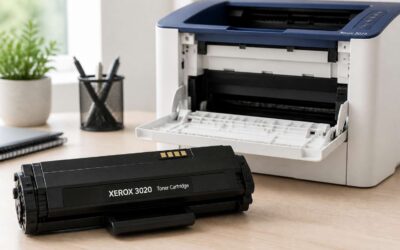
In plain terms, toner is a fine powder used by laser printers, fused to the page with heat; ink is a liquid dye used by inkjets, absorbed by the paper. The phrase ‘how do you replace a toner or an ink cartridge’ flags the topic but the core is knowing which technology your device uses.
- Toner: powder, laser printers, high page yield
- Ink: liquid dye, inkjets, vibrant color, media flexibility
Across South Africa, understanding these differences helps with budgeting and keeps office output consistent.
How printers use cartridges
South Africa’s busy offices know downtime all too well—the cost of printer delays can pile up fast. The question often surfaces: how do you replace a toner or an ink cartridge? The query signals more than a swap; it hinges on understanding how printers manage their internal supplies to keep pages moving.
Cartridges are built for specific technologies and models, and their use shapes budgets and color consistency. By choosing the right cartridge and watching yield expectations, teams can dodge surprises as deadlines loom.
- Which technology your device uses (toner powder vs. liquid ink)
- Yield and cost per page
- Model compatibility and storage considerations
That knowledge supports planning and service reliability across South Africa’s diverse office environments.
Signs you need a replacement
In South Africa’s busy offices, replacing a cartridge can feel like flipping a hidden switch that keeps projects on track. Downtime from cartridge issues cuts into productivity in peak season. The question often rings through meetings: how do you replace a toner or an ink cartridge? The answer isn’t just swapping parts; it’s reading print health and anticipating when a supply is near its limit.
Spotting signs early helps teams dodge surprises. When output shifts—faded text, uneven color, ghosting, or specks—it’s a hint the cartridge is nearing its end, a quiet omen in the machine’s language. Yield and cost per page become crucial as deadlines tighten.
Common indicators to watch for:
- Faded prints
- Streaks or banding
- Frequent warnings about low supply
Storage matters in SA’s climate; heat and humidity can shorten shelf life. Knowing how to answer how do you replace a toner or an ink cartridge becomes part of risk planning, tying procurement, stock rotation, and service reliability.
Types of toner and ink cartridges commonly used
In South Africa’s brisk office halls, the printer’s hum marks the tempo of productivity. How do you replace a toner or an ink cartridge without turning a routine task into a saga? It’s less about swap and more about reading the machine’s breath.
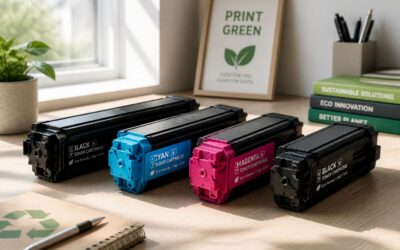
Toner cartridges power laser prints with a fine powder; ink cartridges carry vivid liquids for sharp text and color. Each type demands different handling and timing, especially in SA’s hot, humid climate where shelf life drifts like a mirage.
- Monochrome toner cartridges
- Color toner cartridges
- Inkjet cartridges (pigment-based vs dye-based)
Understanding these nuances helps teams keep work flowing, costs predictable, and maintenance smooth across branches.
Preparation before replacement
Gather the right cartridge model
Across South Africa’s busy offices, every minute of printer downtime costs more than a coffee break. The question how do you replace a toner or an ink cartridge anchors the approach to preparation, turning a routine task into a quiet, deliberate ritual.
Preparation before replacement starts with Gather the right cartridge model and a clear sense of what kind of cartridge your machine prefers. Consider:
- Compatibility with your printer model
- Whether it is toner or ink
- Shelf life and storage
These nuances shape the outcome more than speed, keeping systems calm even when deadlines loom. By weaving caution with curiosity, you prepare for the moment of replacement, when a well-chosen cartridge meets the quiet engine of a business day. The result is not a rushed swap, but a clean cadence that preserves documents, deadlines, and a hint of mystery in the office corner.
Power down and unplug safety
In the quiet before the swap, I feel the office exhale. I ask a single question that keeps the day from tipping: how do you replace a toner or an ink cartridge — not with haste, but as a deliberate ritual that guards accuracy and deadlines.
Preparation before replacement starts with power down and unplug safety. I let the machine cool and the lights go dark, so no stray charge lingers to surprise a fingertip or a cartridge. This quiet pause keeps risk at bay and the day’s signals flowing calmly.
With that calm, I move into the next phase, carrying a tidy workspace and an awareness that the quiet moment is as important as the swap itself.
Prepare your workspace and safety gear
On a sunlit morning in the workshop, the hush before any swap feels like a held breath. “A well-ordered shed is half the harvest,” my grandmother would say, and that truth travels from South Africa’s townships to quiet office desks—calm prep helping every print stay on schedule.
In this moment, preparation means more than knowing the model. Prepare your workspace and safety mood: clear a clean surface, switch off power, and dim the lights so the page glows softly. The question—how do you replace a toner or an ink cartridge—shifts from mystery to method when the area breathes with order.
- gloves to keep fingers clean
- microfiber cloth for quick wipes
- clean, labeled container for cartridges
With this quiet inventory, the day can press on with focus, every detail cared for like a farmer counting kernels before the harvest.
Consult the printer manual and manufacturer guidelines
Morning sun spills over the workshop, and an office statistic hums in the air: 92% of printing interruptions in South Africa’s offices begin with a cartridge that won’t cooperate. In this quiet realm, preparation isn’t just a step—it is a spell. Calibrate intention, listen to the machine, and let order become art.
Preparation before replacement relies on the ancient map found in the printer manual and manufacturer guidelines. They reveal how do you replace a toner or an ink cartridge in the exacting language of the model, sparing guesswork and waste. A quick list, born not of hurry but of care, keeps the voyage true:
- Model and serial compatibility
- Correct cartridge codes and color mapping
- Yield expectations and firmware quirks
With guidance from the manual, the moment becomes clarity rather than chaos, and the page glows with renewed potential as the machine yields to careful preparation and measured respect for its craft.
Gather tools and cleaning supplies
An oft-quoted stat claims 87% of office print delays trace to a cartridge that won’t cooperate. In the preface to replacement, the toolkit becomes a confidant rather than a hurdle. This thoughtful phase is about gathering the right mood as much as the right tools; how do you replace a toner or an ink cartridge? The approach favors calm preparation, a tidy mental desk, and an attitude that treats maintenance as etiquette rather than a nuisance.
- Tools and cleaning supplies
- Protective gear
- Dust-control aids
With that poised kit in mind, the moment becomes choreography; order guides the encounter, and the machine yields to careful, respectful handling.
Step by step replacement process
Open the printer access panel
Printing is one of those daily chores that reveals a lot about a workplace—tiny delays, big costs. In South Africa, offices juggle deadlines and equipment with equal grit. A veteran technician keeps it simple: “Maintenance saves money.” If you’re wondering how do you replace a toner or an ink cartridge, here’s a straightforward path: open the printer access panel and get ready.
- Power down and unplug the device.
- Carefully open the access panel and locate the cartridge cradle.
- Remove the used cartridge straight out, avoiding the drum and contact chips.
- Insert the new cartridge, slide it until it clicks, then close the panel and run a test page.
Tip: Work neatly, keep the waste bag handy, and recycle used cartridges where possible. This small routine keeps offices humming and aligns with broader South African sustainability goals.
Remove the old cartridge carefully
Removing the old cartridge is a telling moment in a busy South African office—it’s a small action that keeps the day moving. The goal is to lift with control, not to yank, so the printer’s delicate alignment isn’t disturbed. Consider this question: how do you replace a toner or an ink cartridge? Grip the cartridge by its sides, keep it level, and ease it straight up from the cradle, away from any exposed contact points.
Step-by-step replacement process:
- Lift the cartridge slowly, keeping it parallel to the unit to avoid snagging on guides.
- Slide it out along the rails until it comes free; place the used cartridge on a protected surface.
- Inspect the cradle briefly and prepare the replacement cartridge to slide in with a gentle click.
Prepare and install the new cartridge correctly
In bustling South African offices, swapping a cartridge can feel almost ceremonial—the moment the old unit lifts away and the workflow keeps humming. The question is: how do you replace a toner or an ink cartridge? The answer rests on a calm, precise sequence that preserves alignment and print quality, turning a routine chore into a smooth, almost magical ritual.
To install the new cartridge correctly, follow these steps:
- Grip the replacement cartridge by its sides and align it level with the cradle.
- Slide it straight in along the guides until it seats with a gentle click.
- Remove any protective tape or seals from the cartridge and wipe away fingerprints.
- Close the access panel and run a test print to confirm proper seating.
With the cartridge seated correctly, the printer wakes to a clean, confident rhythm, and the day’s documents flow again.
Run a printer test page and align cartridges
After you swap the cartridge, the true test is the quiet ritual of confirmation. That moment—where the machine sighs back into life—sparks the question: how do you replace a toner or an ink cartridge without drama in South Africa’s bustling offices? The answer is a calm, step-by-step groove that preserves alignment and print clarity, turning a routine chore into a small triumph.
Run a printer test page and align cartridges to lock in crisp text and bold blacks. The following steps keep the process smooth and speedy:
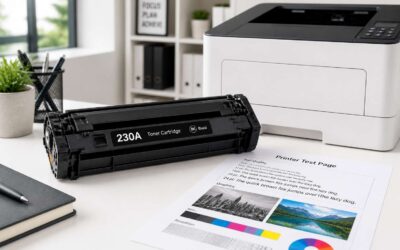
- From the printer’s control panel, select Print Test Page and observe alignment, color balance, and any banding.
- Look at the output on plain paper; note margins, ghosting, or skew that hints at seating issues.
- Use the built-in alignment or calibration feature to fine-tune automatically.
- Print a final test page to confirm everything is sharp and even across the page.
Small tweaks now save bigger headaches later—your documents will look as confident as your office coffee ritual.
Troubleshooting and common issues
Cartridge not recognized by the printer
Crackling ideas deserve clean pages, yet a stubborn cartridge can stall the story. If you’re wondering how do you replace a toner or an ink cartridge, you’re not alone—printers balk at the moment of truth, then sing again when the fit is right.
Cartridge not recognized by the printer is a common hiccup. Causes range from compatibility gaps to debris on contacts or sensor confusion.
- Incompatibility between cartridge and printer model or regional packaging
- Improper seating or packaging that leaves contacts misaligned
- Dust, debris, or moisture on cartridge contacts
- Firmware or sensor quirks that momentarily confuse recognition
Understanding these signals helps keep projects moving and aligns expectations with manufacturer guidelines.
Poor print quality and color problems
Print quality shapes the impression your work makes, and in South Africa’s bustling offices, poor output eats time and energy. For those asking how do you replace a toner or an ink cartridge, the answer begins with reading the page you get and spotting patterns of trouble.
Troubleshooting centers on banding, color shifts, and ghosting—issues that whisper, not shout. Common culprits include misalignment, dust on contacts, and moisture, along with firmware quirks that momentarily confuse color rendering.
Common symptoms include:
- Banding and ghosting
- Unnatural color casts
- Streaks or smudges
Observing these cues and consulting the manufacturer guidelines can steer projects away from unnecessary downtime.
Bleeding, smudges, or streaks
When the page sighs instead of sings, troubleshooting becomes a quiet art. Bleeding, smudges, or streaks appear as telltale signs, whispering of misalignment or moisture. So, how do you replace a toner or an ink cartridge? The answer starts with reading what prints and noticing patterns in the light and shadow of text.
Common cues to heed include the following:
- Bleeding along page edges
- Smudges that migrate after a touch
- Color streaks that march in one hue
Observing these cues and consulting the manufacturer guidelines helps keep downtime gentle on the workflow and morale of South Africa’s busy offices.
Resolving cartridge errors and reset procedures
In busy South African offices, printer downtime gnaws at momentum. A single misprint or ghosted image can derail a deadline and drain morale. Even a brief hiccup prompts the IT desk to whisper about toner and cartridge health—the kind of glitches that ripple through the day.
how do you replace a toner or an ink cartridge? Troubleshooting begins with reading patterns in the print and listening to the page’s whispers: faint color shifts, faint halos, or unusual darkness. Start with high‑level checks—compatibility, firmware prompts, and environmental effects—then let the system guide you back to crisp text without breaking the workflow.
- Check for compatibility warnings and firmware prompts
- Observe color consistency and potential moisture exposure
- Verify the cartridge bay is clear of debris and seats securely
Reset procedures aren’t dramatic rituals; they’re careful recalibrations. A soft reset or driver reinitialization can clear counters and re-synchronise the print engine, restoring balance between ink and paper and giving your pages their voice back.
What to do if the printer flags a low toner warning
In South Africa’s bustling offices, even a single hour of printer downtime can steal momentum and morale! When the printer flags a low toner warning, teams feel the pressure—the ghosting, the faint halos, the slightly off color that whispers there’s a story to tell. The question arises: how do you replace a toner or an ink cartridge, calmly and correctly, without derailing the workflow.
Listen to the page: subtle color shifts and unexpected darkness point to the toner narrative. Check that compatibility warnings align with your model, and that firmware prompts aren’t steering you off course. If the system seems uncertain, give it a moment to re-initialize or recalculate—often a soft reset rebalances ink and paper, restoring crispness and keeping the day moving!
Maintenance, cost-saving and environmental tips
When to replace versus refill or refill options
Maintenance hides in plain sight, quietly preserving print quality and slashing downtime. I approach replacements with care, weighing page yield, storage, and the printer’s subtle signals. When to replace versus refill—or explore refill options—depends on cost, reliability, and how you print each day.
Cost-saving hinges on high-yield cartridges and respecting the model’s standards. In SA offices, recycle spent cartridges through manufacturer programs, reuse packaging where possible, and enable duplex printing to halve paper use. Small choices today reduce waste and keep operating costs predictable.
If you’re wondering how do you replace a toner or an ink cartridge, timing and fit matter. If the print fades or colors shift, assess the model number, installation integrity, and available refill options, then run a test page to confirm steadiness.
Recycling and disposal options for used cartridges
In South African offices, the cartridge lifecycle is a strategic fixture, not a last-minute afterthought. A sizable share of print waste traces back to spent cartridges, nudging budgets and sustainability in the same breath. When you ask, how do you replace a toner or an ink cartridge, the answer leans toward fit and timing—not haste—and toward considering the footprint left behind.
Maintenance discipline trims costs and downtime. Choosing high-yield options that respect the printer’s design, and enabling duplex printing reduces paper use while keeping lines moving. A quiet test page after a swap can confirm steadiness without fanfare.
Recycling and disposal options for used cartridges in SA are plentiful and reflect a broader ethic: keep materials in circulation rather than landfills. Consider manufacturer take-back programs, local e-waste facilities, and refurbish-and-donate pathways.
- Manufacturer take-back programs
- Local e-waste facilities
- Refurbish-and-donate options
Tips to extend cartridge life and reduce waste
In the rhythm of a South African office, maintenance becomes the quiet engine of performance and responsibility. The question—how do you replace a toner or an ink cartridge—finds its answer in fit and timing, not haste, and in the footprint we leave behind. I’ve learned that small, thoughtful choices can transform a workday into something steadier and brighter!
Smart maintenance becomes the rhythm that preserves value and uptime, a gentle discipline aligned with the printer’s design. It honours the balance between capability and care, letting the machine sing with steady performance. A quiet test page becomes a moment of reassurance, a lyric gesture in the wake of a swap.
Choosing OEM versus compatible cartridges and warranties
‘Small, steady maintenance beats big, flashy replacements,’ a South African IT head likes to say, and I’m inclined to agree. In the rhythm of a local office, maintenance is the quiet engine that keeps performance honest. The question ‘how do you replace a toner or an ink cartridge’ is really about fit and timing, not haste, and about the footprint we leave behind.
- OEM vs compatible cartridges: weigh print quality, reliability, and warranty implications against upfront savings.
- Warranty alignment: ensure your choice won’t void coverage or complicate support.
Smart maintenance also means trimming waste. Consider environmentally friendly options, take-back programs, and recycling networks here in SA. Choosing responsibly can lower long-term costs, support local suppliers, and keep office printers humming while the planet thanks you.
Alternative saving strategies and bulk buying tips
Maintenance is the quiet engine that keeps printers honest and costs contained. It isn’t about flashy upgrades; it’s about timing, fit, and care. If you ask how do you replace a toner or an ink cartridge, the answer is a workflow—power down, consult the manual, and snap the cartridge into place so print quality stays sharp and predictable. A whisper of efficiency lingers in the room, supernatural in its consistency.
Smart cost-saving hinges on planning and bulk buying done right. Build relationships with distributors who stand by you when stock runs low, and lock in predictable pricing.
- Bulk strategies and supplier partnerships
- Long-term pricing and stock management concepts
- Take-back and recycling alignment with local networks
Environment-conscious choices pay off. Take-back programs and recycling networks in SA reduce waste and can trim costs. Align with suppliers offering green options and energy-efficient settings, so the office hums along while planet breathes easier.

0 Comments