Essential Facts About the Xerox 3020 Toner
Compatible Cartridge Models
A busy South African office prints thousands of pages each month. The toner cartridge xerox 3020 remains a common choice for compact workgroups, yet many users misunderstand what fits inside their machine. You need the right model for the specific Phaser 3020 series, and that distinction matters more than you might expect.
Here are the essential facts to check before you buy:
– The standard yield cartridge delivers roughly 1,500 pages
– A high capacity variant pushes that figure to around 3,000 pages
– Your printer uses a specific chip to track toner levels
– The cartridge houses both toner and the imaging unit
That last point is critical. Because the drum is built into the cartridge, every replacement restores print quality across the board. Compatible brands offer solid performance, but confirm the chip matches your printer’s firmware. This tiny detail dictates whether your machine recognises the cartridge at all. Genuine Xerox units carry a premium price, so many local suppliers stock alternatives that match the original specs. When you swap the toner cartridge xerox 3020 correctly, your output remains sharp and dependable.
Page Yield and Coverage Estimates
Every page yield rating starts with a 5% coverage assumption. That figure describes a typical text page, not a dense report or a slide deck. Real South African office documents often push past that baseline. A spreadsheet with heavy borders or a contract with bold headings can consume toner at double the expected rate. The toner cartridge xerox 3020 tracks its own consumption and reports the status to the printer. That status is an estimate, not a promise.
- Bold fonts and large headings
- Shaded table cells
- Logos and watermarks
The machine’s firmware calculates the remaining toner using a complex algorithm that assumes consistent patterns. Real workflows vary. The imaging drum wears down faster with dark graphics. Print quality drops before the toner runs out entirely, so the coverage estimate guides replacement timing.
Genuine vs. Remanufactured Options
The price per millilitre of printer toner often rivals that of vintage champagne, a fact that makes the choice between original and remanufactured cartridges a financial decision with real teeth. Many South African businesses look twice at the substantial savings offered by third-party refills, yet the true cost is rarely the invoice price.
A genuine toner cartridge xerox 3020 is engineered as part of a single, cohesive system. The printer and its original cartridge share a communication protocol that remanufactured units often fail to replicate. This affects the unreliability of toner level readings, the uniform distribution of powder, and the lifespan of the imaging drum. A remanufactured shell, refilled with a lower-grade powder, may promise the world but often delivers streaked pages and premature wear on the printer itself.
– Voiding of the manufacturer’s warranty
– Inconsistent print output which wastes paper, and time
– The need to replace the cartridge far sooner than an original
Trust in a component that supports your business’s professional face. The savings from a knock-off are a false economy when measured against the cost of reprinting and lost credibility.
Identifying Your Printer Series
Every Xerox 3020 printer carries a distinct identity, and it matters more than you might think. The rear serial plate holds the exact model string, whether that is WorkCentre 3020 or 3020BI. This distinction determines which toner cartridge xerox 3020 variant your machine accepts. A single digit difference can mean the difference between a clean install and a jammed hopper.
The series information appears in three places:
- The serial plate on the back panel
- The status page printed from the control panel
- The label inside the toner access door
I also check the firmware date in the Information menu. Some older firmware releases reject newer batches of toner cartridge xerox 3020 stock until updated. Knowing your series and firmware prevents wasted orders and keeps your printing schedule intact.
Selecting the Ideal Replacement Cartridge
OEM Cartridges vs. Third-Party Brands
A single replacement cartridge can cost as much as sixty percent of the original printer price. That makes the OEM versus third-party decision a financial one. For the toner cartridge xerox 3020 users across South Africa, the choice involves more than brand loyalty. OEM units deliver predictable performance and warranty coverage. Third-party options vary in quality, with the seller reputation often outweighing the product itself. Buying a toner cartridge xerox 3020 from an unknown importer is a gamble that sometimes pays off, yet it can also produce streaky pages and wasted time. Some local suppliers offer warranties rivaling the manufacturer’s own terms. Others provide only a low price and no accountability. Print frequency, storage conditions, and your tolerance for reprints all factor into that equation.
Checking Cartridge Compatibility
One mismatched cartridge can consume an entire afternoon of troubleshooting. That is the reality South African users face with the toner cartridge xerox 3020. I always inspect the chip and the part number before purchase, because a single digit shift turns a printer into a paper jam machine.
Heat and humidity accelerate toner clumping. Verify the package seal and ask for the manufacturing date. A fresh unit with an outdated chip triggers phantom error codes.
- Confirm the chip version matches your printer’s firmware.
- Request written warranty terms from the seller.
The right cartridge aligns with your print volume and storage conditions. True compatibility covers the chip’s logic, the packaging history, and the supplier’s accountability.
Reading Packaging Labels Correctly
A single misread digit on a packaging label can cost a week of printing downtime. When I hold a toner cartridge xerox 3020 in my hands, I read the label line by line. The manufacturing date tells a story of storage conditions. The part number confirms which chip generation is inside.
Labels carry the truth of the cartridge’s journey. A crushed seal, a smudged barcode, a faint inkjet code, these details matter more than the brand logo.
- Check the date code format; a mismatch reveals a repackaged unit.
- Verify the serial number matches the outer carton.
- Confirm the chip firmware version is printed, not assumed.
South African sun and coastal humidity alter the packaging long before the toner meets the drum. Look for the supplier’s physical address and a contact number on the label. No address means no accountability.
Considering High-Capacity Cartridges
Most offices choose a replacement cartridge based on the price sticker. The cost per page tells a different story. For a toner cartridge xerox 3020, the high-capacity version often changes that calculation entirely. I have watched procurement teams spend more on frequent standard replacements than they would have on a single larger unit.
The decision rests on three factors:
- Monthly print volume compared against the rated output of each cartridge.
- Storage conditions and how long the cartridge will sit before its first use.
- Supply chain reliability in your region, especially during load shedding.
A busy law firm in Sandton printing contracts daily will recover the higher upfront cost of the high-capacity unit within a few months. A home office printing a handful of pages weekly will likely never see that return. The toner cartridge xerox 3020 market offers both formats for a reason. Matching the cartridge to the workload keeps both your budget and your printer healthy.
Where to Purchase Reliable Cartridges
Finding a dependable supplier means more than choosing the lowest price. A toner cartridge xerox 3020 can behave differently depending on its storage history and handling. Heat and humidity during shipping, especially across long South African routes, affect print quality more than most buyers expect.
Here is what I look for in a vendor:
– Explicit stock rotation dates on packaging
– Local warranty support that includes delivery to your door
– Clear returns policy for defective units
The purchasing decision also involves timing. Buying from a source that moves high volume ensures fresher stock. A toner cartridge xerox 3020 acquired from a store with dusty shelves may sit for months in a warehouse. That delay translates to wasted toner and frustrating streaks.
A Comprehensive Installation Walkthrough
Preparing the Printer for a Swap
Replacing a toner cartridge xerox 3020 rarely goes wrong because of the cartridge itself. It goes wrong because someone rushed the preparation. After a long print run, the fuser unit stays warm, so give it fifteen minutes to cool. I’ve learned this the hard way.
The preparation follows a simple sequence:
- Switch the printer off using the power button, then unplug the power cord from the wall.
- Clear the area around the printer. Remove any paper, documents, or loose cables that could get in the way.
- Place a drop cloth or old newspaper beneath the cartridge access area to catch stray toner.
- Open the front cover slowly to release any residual static that may pull toner into the air.
With the machine cool and the workspace clean, the swap becomes quiet work. No fumbling, just a fresh toner cartridge xerox 3020 sliding in. Time spent preparing makes the process feel effortless.
Removing the Old Cartridge Safely
Few operations call for patience like lifting the spent toner cartridge xerox 3020 from its cradle. The front cover swings down, revealing a cavity where the drum surface still carries a residual electrostatic charge from its last run.
Place one hand beneath the cartridge’s handle, the other against its rear flange. The toner hopper will resist slightly, held by a firm suction seal. Rock the unit upward at a careful angle to break that seal without spilling residual powder.
- Keep the cartridge level as you withdraw it from the rails
- Hold it over the drop cloth until it clears the printer frame
- Set it upright on its end, never on its side
Do not shake the exhausted unit. The spent toner inside has settled into a fine crust along the hopper walls. A sudden jolt sends that powder airborne. Slide the toner cartridge xerox 3020 into the packaging from the replacement and seal it for recycling.
Unpacking and Shaking the New Cartridge
The sealed box holds the new unit, its packaging a fortress of cardboard and foam. Slicing the tape feels like the first real step forward. Inside, the toner cartridge xerox 3020 sits cocooned in a protective bag, its surfaces untouched.
Lifting it out, you will notice the weight distribution immediately. The toner sloshes slightly, a fine powder waiting to be distributed across the drum. Handle it with purpose. The shaking process is not ceremonial, it is mechanical.
– Hold the cartridge by its central grip, keeping it level.
– Rock it side to side, not end over end, for a full ten seconds.
– Listen for the internal toners to loosen and shift.
This action redistributes the powder that has settled during transit. A cartridge shaken too gently will print patchy, faint pages. One shaken too vigorously risks spilling toner through the seams. The sweet spot is a firm, consistent motion.
Align the cartridge with the rails inside the cavity where the old unit once sat. The fit is deliberate, and the guides will accept the toner cartridge xerox 3020 with a reassuring click when seated correctly.
Inserting the Cartridge Correctly
The empty bay is open, dark, and silent. The exact angle matters here. Slide the toner cartridge xerox 3020 along the lower guide rail first, then press upward until the plastic teeth catch. You will feel resistance. I have seen people force it. That resistance is the lock engaging, not an obstacle.
There is a sequence to it that most people miss. Follow this order:
- Line the colored arrows on the cartridge body with the matching arrows inside the printer.
- Push the cartridge in until it stops moving forward.
- Press down firmly on the top edge until you hear the click.
That click is the sound of the toner cartridge xerox 3020 seating itself! The cartridge is now part of the machine. The printer registers it immediately.
Running the Alignment and Calibration
Most installation guides end the moment the cartridge clicks into place. The printer has other plans. Once the toner cartridge xerox 3020 is seated, the display prompts an alignment routine. Skipping this step produces blurred text and uneven toner distribution.
The sequence takes under three minutes:
- Print the alignment page from the printer menu.
- Place the printed page face down on the scanner glass.
- Press Start. The scanner reads the registration marks and adjusts the laser timing.
Calibration then runs automatically. It corrects for paper moisture and thickness, both of which vary across South African seasons. The toner cartridge xerox 3020 finishes the process with precise dot placement. A five minute investment spares you a ream of wasted paper.
Disposing of Used Cartridges Responsibly
A comprehensive installation walkthrough handles the toner cartridge xerox 3020 with care. Every twist, click, and alignment prompt serves a purpose. Rushing the process invites smudges and uneven fusing. The walkthrough ends only when the printer recognises the new unit and the first test page emerges clean.
Once the job is done, the old cartridge requires responsible disposal. South African users can:
- Drop spent cartridges at participating office supply stores.
- Use municipal hazardous waste collection events.
- Request a courier pickup through manufacturer take-back programs.
These routes prevent residual toner from leaching into groundwater. Proper disposal converts a spent component into raw material for new products, benefiting the environment without fanfare.
Pro Tips to Extend Cartridge Lifespan
Adjusting Printer Settings for Economy
Your toner cartridge xerox 3020 will outlast your patience if you treat it right. One habit that pays dividends is switching to draft mode for internal documents. The driver also offers a toner save option, which reduces coverage without rendering text illegible.
For the frugal among us, consider these adjustments:
- Lower the resolution to 600 DPI for routine printing
- Enable the eco mode from the control panel
- Set the paper type to “recycled” to trigger a conservative toner algorithm
These small tweaks let your cartridge stretch further, especially when printing spreadsheets or reference copies. Just remember to switch back for presentations or anything client-facing. Your toner levels will thank you, and so will your budget.
Proper Storage Conditions for Spare Toner
Few people consider what happens to a spare toner cartridge xerox 3020 while it waits in a cupboard. Heat is the silent antagonist. A storage closet near a window or above a humming appliance can degrade the toner chemistry slowly, resulting in faded prints or streaky pages long before the cartridge reaches its expected yield. The ideal environment stays cool, dry, and away from direct sunlight. Aim for a stable temperature between 10 and 25 degrees Celsius, which keeps the fine powder flowing evenly through the drum assembly.
Humidity demands equal respect. Coastal regions in South Africa, particularly Durban or Cape Town, expose cartridges to moisture that causes toner clumping. Once clumps form, the cartridge may produce ghost images or uneven density across the page. Keep the unit sealed in its original foil wrapping until the moment of installation. The wrapper is not just packaging; it is a barrier against airborne dust and fluctuating moisture levels.
Store the cartridge upright, exactly as it ships from the manufacturer. Laying it flat increases the risk of toner settling against the drum seal, which can lead to leaks or premature wear. If you must place multiple spares together, leave space between them. Packed tightly, the plastic housings transfer vibrations that may disturb the internal powder bed.
For those managing several units at once, a quick rotation system prevents unnecessary aging.
- Label each cartridge with its purchase date
- Place older stock at the front of the shelf
- Check the seal integrity every few months
- Never store near photocopiers or laser printers that emit ozone
These practices directly protect your investment in a toner cartridge xerox 3020. A cartridge that sits correctly will perform as well as one fresh from the box, so treat your inventory like a fragile asset. The reward appears the moment you slide it into the printer and the first page emerges without a single streak.
When to Clean the Drum and Rollers
The drum on a toner cartridge xerox 3020 is a photoconductive surface that stains easily with fingerprints. Bare fingers leave oils that attract dust. Handle the cartridge by its sides only. If prints show repeating spots, inspect the drum under bright light. Use a soft, lint free cloth to wipe loose toner. Never use water or solvent. The rollers also collect paper fibers over time. A dry cloth wipe restores consistent feed. Clean only when you see defects. Over cleaning accelerates wear. For heavy usage, check monthly. Otherwise, look for these cues:
- Repeating marks at fixed intervals
- Ghost images on the page
- Streaks running along the paper
One more step: rotate the toner cartridge xerox 3020 slowly before reinsertion to redistribute toner. That simple action revives tired prints. Regular inspection keeps performance strong.
Solving Common Toner and Print Problems
Dealing with Faded or Streaky Output
Faded or streaky output usually points to a distribution problem inside the toner cartridge xerox 3020, not a mechanical failure. When toner sits for weeks in a dry Highveld winter, it clumps against the developer roller, leaving pale bands across the page. A gentle rock of the cartridge, side to side, redistributes the powder before you waste another sheet.
Streaking tells a different story, and the pattern itself offers the clearest clues:
- Repeating marks at even intervals suggest drum damage
- Vertical lines that fade toward the page edge indicate a clogged wiper blade
- Random grey smudges often come from overfilled cartridges
I have seen users replace a perfectly good toner cartridge xerox 3020 over a simple buildup issue. Persistent streaks after a thorough check usually mean the imaging unit has reached the end of its life. At that point, replacement costs less than chasing an elusive fix.
Fixing Error Messages and Warnings
Error messages on the control panel often provoke unnecessary alarm. The toner cartridge xerox 3020 flags warnings that seem urgent but usually mean one of three things: the cartridge is seated incorrectly, the chip has lost contact, or the printer is detecting a genuine supply issue. I have seen a simple reseat resolve a permanent ‘Replace Toner’ alert in seconds!
Warning codes demand a methodical approach. For a toner cartridge xerox 3020, the most common displays include:
– ‘Toner Low’: the cartridge holds less than 15 percent powder, but print quality stays intact.
– ‘Cartridge Not Detected’: a dirty chip contact or loose installation.
– ‘Unsupported Cartridge’: a third-party unit lacks the correct chip firmware.
Each alert points to a distinct cause. Ignoring them invites jams or premature wear on the imaging drum. Reading the code, rather than reacting to it, prevents wasted effort.
Resolving Paper Jams Linked to Toner
Paper jams rarely happen without a reason. In my experience, a leaking toner cartridge xerox 3020 is often the silent culprit. Toner dust settles on the paper path, making rollers slippery and causing misfeeds. The fix involves more than just pulling out the jammed sheet. You must inspect the cartridge for damage and check for toner residue along the rollers.
Common causes of jams linked to toner:
– Overfilled remanufactured cartridges
– A scratched drum surface
– Using paper below the recommended weight
Addressing these issues keeps the feed mechanism clean. A simple wipe down of the rollers with a dry cloth often restores proper traction. Remember, a clean path means fewer interruptions.
Clearing Clogged Toner Nozzles
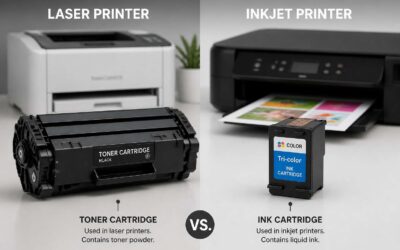
A toner cartridge xerox 3020 can develop a stubborn clog at its dispensing outlet. Unlike ink printers, laser toner does not spray through nozzles. The powder thickens and cakes when humidity creeps into the hopper. This buildup halts the flow and leaves blank patches across the page.
I have seen this happen after long idle periods. The compacted toner refuses to release. You might feel tempted to shake the cartridge vigorously. Do not. A calm, rocking motion serves better. Place the cartridge on a padded surface and tilt it gently from side to side.
- Keep the drum shielded from light.
- Rock the unit ten times slowly.
- Let the powder settle for two minutes.
Reinstall the cartridge and print a test page. The consistency of the output should return to normal when the clog clears.
Smart Buying and Cost-Saving Strategies
Using Subscription Services for Automatic Delivery
Subscription services for automatic delivery are a quiet essential for toner management. You schedule the frequency once, and a fresh toner cartridge xerox 3020 arrives before the current one expires. No more urgent calls to suppliers. No more express courier fees because the cartridge emptied on a Tuesday afternoon.
South African offices benefit from predictable budgeting. Instead of absorbing a large sum quarterly, you spread the cost across monthly payments. Many suppliers discount prices for recurring orders. Some even allow you to pause or skip deliveries when your printing pattern shifts.
Compare these details before committing:
- Cost per page across different subscription tiers
- Return and refund policies for unopened cartridges
- Whether the provider includes tracking and insurance
Automation still requires attention. Track your monthly print volume. Otherwise, your cupboard will overflow with toner cartridge xerox 3020 units while the paper budget shrinks.
Recycling Programs and Discounts
Somewhere between the printer’s first groan and the fourth frantic call to the IT guy, the cost of replacement becomes a moral question. Smart buying for the toner cartridge xerox 3020 involves scavenging for discounts hidden inside your own waste bin.
Many suppliers run recycling programmes that offer credit for each spent cartridge. You ship back the empty, they chip in toward the next toner cartridge xerox 3020. Some South African vendors provide tiered discounts for bulk returns, making empties a reliable source of savings.
- Ask about trade-in value for returned cartridges
- Check if discounts apply to future orders
- Combine loyalty points with seasonal sales
The trick is timing. Buy during promotional windows, stack the credit, and let the office manager feel smug. They turned rubbish into rebates, which improves the department’s budget without input from finance.

0 Comments